By Brian French, Publisher of Florida Medical News .com
A Best-Practices Tutorial for Medical Products & Services
This guide walks a Florida-based medical product or service business (clinics, med spas, device makers, home health, dental, physical therapy, telehealth, etc.) through planning, producing, publishing, and repurposing YouTube videos that build trust and generate patients or customers.
1. Start With Compliance (The Non-Negotiable First Step)
Before style or equipment, medical marketing has rules general businesses don’t:
- HIPAA: Never show a patient’s face, name, chart, or identifying detail without a signed, written media release (separate from treatment consent). This includes patients visible in the background of B-roll.
- Testimonials: Florida law and professional boards (Florida Board of Medicine, Board of Dentistry, etc.) restrict deceptive or unverifiable claims. Testimonials must reflect typical results or include clear disclaimers. Never script or pay for testimonials without disclosure (FTC endorsement rules).
- Claims: Avoid “cure,” “guaranteed,” “painless,” “#1,” or superiority claims you can’t substantiate. If you market an FDA-regulated device or product, stay within its cleared/approved indications.
- Disclaimers: Add a standard line to every video and description: “This video is for educational purposes only and is not medical advice. Consult a licensed provider.”
- Licensing display: If a provider appears on camera, show their credentials accurately (MD, DO, ARNP, DPT, etc.).
Have your compliance officer or healthcare attorney review your first few scripts. After that, use an approved script template.
2. Video Style: Formal or Informal?
Recommended: “Professional-casual” — informal delivery with formal standards.
Healthcare audiences want two things at once: competence and approachability. The data across medical marketing consistently favors:
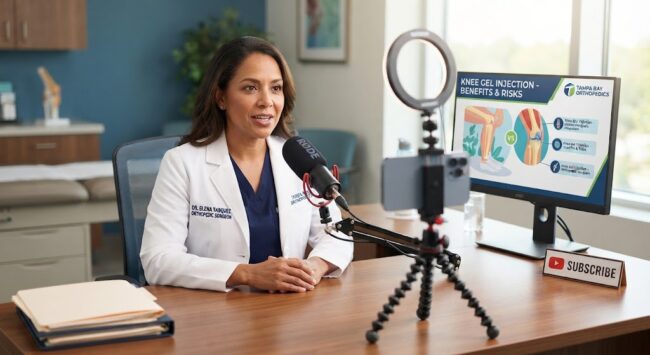
- Conversational tone, credentialed speaker. A physician or clinician speaking naturally to camera outperforms both a slick corporate voiceover and an overly casual influencer style.
- When to lean formal: B2B medical devices, hospital systems, surgical services, anything involving serious diagnoses. Use structured scripts, measured pacing, and clinical settings.
- When to lean informal: Med spas, chiropractic, physical therapy, wellness, dental cosmetics, DME/consumer products. Use first-person delivery, humor sparingly, behind-the-scenes footage, and Shorts.
- Florida-specific angle: Your audience skews toward retirees/snowbirds in many markets (slower pacing, larger on-screen text, captions always on) and bilingual communities in South Florida (consider Spanish subtitles or fully Spanish versions — this alone can double your addressable audience in Miami-Dade, Broward, Orange, and Hillsborough counties).
Rule of thumb: Dress and set = formal (clean scrubs/white coat or business casual, tidy clinical or office background). Delivery = informal (talk like you’re explaining to a patient in the exam room, not reading a press release).
3. Equipment Recommendations
You do not need a production studio. Audio quality matters more than video quality in healthcare — viewers forgive average visuals but not muffled audio.
Starter kit (~$300–$600)
- Camera: A recent iPhone or Android flagship shooting 4K/30fps. Genuinely sufficient.
- Microphone: Wireless lavalier system — DJI Mic 2 or Rode Wireless GO II (~$200–$350). This is your single most important purchase.
- Lighting: One 18″ ring light or a softbox key light (~$50–$100). Face a window for free fill light.
- Tripod: Any sturdy phone tripod with a level head (~$30).
- Teleprompter (optional but great): A phone/tablet prompter rig (~$100–$150) helps nervous clinicians deliver clean takes.
Upgrade kit (~$1,500–$3,000)
- Camera: Sony ZV-E10 II or Canon R50 with a kit lens.
- Audio: Add a shotgun mic (Rode VideoMic) for room-based demos.
- Lighting: Two-point LED panel setup (key + fill), e.g., Amaran or Godox.
- Backdrop: Keep your real clinic visible when possible — authentic environments build more trust than seamless paper backdrops.
Setup tips
- Camera at eye level, subject 4–6 feet from the background to create depth.
- Record in a carpeted or soft-furnished room to reduce echo (avoid empty exam rooms with hard tile — they sound like a bathroom).
- Always record 10 seconds of “room tone” for editing.
4. Narration & On-Camera Delivery Tips
- Hook in the first 5 seconds. Open with the question the viewer typed: “Does knee gel injection actually work? Here’s what the research says.” Never open with a logo animation.
- One idea per video. If your outline has three topics, that’s three videos.
- Speak to one person. Say “you,” not “our patients” or “people.”
- The exam-room test: Write the script, then read it aloud and rewrite anything you’d never actually say to a patient face-to-face.
- Plain language, then the medical term. “The tube that carries food to your stomach — the esophagus…” This helps both patients and search engines.
- Pacing: Slightly slower than normal conversation, with deliberate pauses. Especially important for a 55+ Florida demographic.
- Bullet scripting beats word-for-word. Give the speaker 5–7 bullet points and let them talk. Memorized scripts read as stiff; teleprompters help if a full script is required for compliance.
- Batch record. Film 4–8 videos in one half-day session per month. Same outfit changes per video so they don’t all look identical.
- Retakes are cheap. Do the first 15 seconds three times; you’ll almost always use take three.
5. Editing Best Practices
- Software: DaVinci Resolve (free, professional), CapCut (fast, great for Shorts), or Descript (edits video by editing the transcript — ideal for non-editors and clinicians).
- Cut ruthlessly: Remove every “um,” dead pause, and false start. Jump cuts are normal and expected on YouTube.
- Captions on everything. A large share of viewers watch muted, and captions help accessibility and AEO (Section 8). Burn them in on Shorts; use YouTube’s caption file (edited for accuracy — auto-captions mangle medical terms) on long-form.
- On-screen text: Reinforce key stats and terms (“Recovery time: 2–4 weeks”). Use large, high-contrast text.
- B-roll every 15–30 seconds: Clips of the clinic, equipment, hands demonstrating, animations. Keeps retention up. (Remember: no identifiable patients without releases.)
- Length targets:
- Shorts: 30–60 seconds
- FAQ/educational: 3–7 minutes
- Procedure deep-dives / testimonials: 8–12 minutes
- End screens: Last 20 seconds should point to a related video and your subscribe button — not just fade to logo.
- Thumbnails: Real face + 3–5 large words (“Is It Painful?”). Faces outperform stock imagery dramatically. Keep a consistent template.
6. Branding
- Consistent intro (2–3 seconds max) — a quick logo sting, not a 15-second animation.
- Brand kit: Lock your 2–3 colors, one headline font, logo placement (lower-third corner), and thumbnail template. Every video should be recognizable at a glance in a search results page.
- Lower-thirds: Name + credentials + practice name every time a speaker appears.
- Channel assets: Banner with your value proposition and location (“Orthopedic Care for Tampa Bay”), organized playlists by condition/service, a 60–90 second channel trailer.
- Humanize the brand: The provider is the brand in medical marketing. Feature the same 1–2 faces consistently rather than rotating anonymous narrators.
- Localize: Mention your city/region naturally on camera and in metadata — “here in Sarasota” — this feeds local search and makes the content feel personal.
7. Education vs. Hard Selling
The 80/20 rule: 80% educate, 20% (softly) sell.
Healthcare decisions are high-trust, long-consideration purchases. Hard selling actively damages credibility and can create compliance risk.
- Educational videos (the 80%): Condition explainers, “what to expect” walkthroughs, myth-busting, recovery tips, insurance/cost transparency, FAQ answers. These rank in search, get shared, and position you as the authority.
- Promotional videos (the 20%): Practice tours, provider introductions, compliant patient stories, new service announcements. Even these should lead with the patient’s problem, not your offer.
- The soft CTA formula: Educate fully, then close with one low-pressure line: “If you’re dealing with this in the [Orlando] area, we’re happy to take a look — the link to schedule is below.” One CTA per video. Never countdown timers, “limited spots,” or discount pressure on medical services.
- Why this works: A viewer who watches a physician generously explain their condition for six minutes arrives at the consultation pre-sold. The education is the selling.
8. Optimizing for AEO (Answer Engine Optimization)
AEO means optimizing so AI assistants (ChatGPT, Claude, Gemini, Perplexity) and Google’s AI Overviews cite and surface your content when people ask questions — increasingly how patients search.
- Title videos as literal questions. “How Much Does Cataract Surgery Cost in Florida?” beats “Cataract Services Overview.” Pull real phrasing from Google’s “People Also Ask,” AnswerThePublic, and questions patients actually ask your front desk.
- Answer in the first 30 seconds. Give the direct answer up front, then elaborate. Answer engines extract concise, early, definitive statements.
- Upload accurate transcripts/captions. AI systems read transcripts. Correct every medical term — this is your most important AEO asset.
- Structured descriptions: First 2–3 lines = a plain-English summary answering the title question. Then timestamps/chapters with question-style labels (“2:14 – Does insurance cover it?”).
- Chapters (timestamps): Break every long video into question-based chapters. Google surfaces these as “key moments” and AI engines use them for citations.
- Schema markup on your website: When you embed the video in a blog post (Section 10), add
VideoObjectandFAQPageschema so answer engines can parse it. - Entity consistency: Same business name, address, phone, and provider names across YouTube, your site, and Google Business Profile. Answer engines cross-reference entities.
- Cover full question clusters: For each service, systematically produce videos on cost, pain, recovery time, candidacy, risks, alternatives, and insurance. Owning the whole cluster makes you the citable authority.
- E-E-A-T signals: Credentialed speakers, cited sources (“a 2024 study in JAMA found…”), and author bios on companion blog posts. Medical content is held to the highest trust standard by both Google and AI engines.
9. FAQ Videos: Your Highest-ROI Format
Collect the 20–30 questions your staff answers by phone every week. Each one is a video.
Format options:
- One question = one Short/short video (best for AEO). Title is the exact question; answer delivered in under 90 seconds.
- Monthly “Ask the Doctor” compilation: 5 questions in one 8–10 minute video with chapters per question.
Example FAQ set for a Florida med spa or clinic:
- “How much does [treatment] cost?” (Cost transparency videos massively outperform — most competitors are afraid to make them.)
- “Does it hurt?”
- “How long is recovery?”
- “Am I a candidate?”
- “Does insurance / Medicare cover it?” (Huge for Florida’s Medicare population.)
- “What happens at the first appointment?”
- “What are the risks/side effects?”
- “[Treatment A] vs. [Treatment B] — which is right for me?”
Pin a comment inviting viewers to ask their own questions — this generates your next round of topics and boosts engagement signals.
10. Republishing & Distribution (One Video → Seven Assets)
Never let a video live only on YouTube. For every long-form video:
- Blog article on your website. Embed the YouTube video, then publish a cleaned-up transcript rewritten as a 700–1,200 word article with H2 subheadings matching the video chapters. Add
FAQPageschema. This gives you a Google search asset, an AEO asset, and watch-time from your own site traffic. - Your website service pages. Embed the relevant explainer video directly on the matching service page — pages with video convert consultations at significantly higher rates.
- FloridaVideoNews.com — https://www.floridavideonews.com — a Florida-focused video news/content platform where local businesses can submit or republish video content for additional statewide exposure and a backlink. (Verify their current submission process and editorial guidelines on the site; I can’t confirm its current status or terms, so review it directly before submitting.)
- Shorts / Reels / TikTok: Cut 2–3 vertical clips (the hook, the key answer, a surprising fact) from every long video.
- Google Business Profile: Upload or link videos as posts — strong local SEO signal for “near me” searches.
- Email newsletter: One video per send with a thumbnail image linked to the blog post (not directly to YouTube, so traffic hits your site first).
- LinkedIn / Facebook: Native uploads with a caption summary. Facebook remains strong for the 50+ Florida demographic; LinkedIn matters for B2B devices and referral relationships with other providers.
- Press/local outlets: Florida local news sites and community publications (Patch, local chamber newsletters, TBBJ/OBJ for B2B) often accept expert video content or will interview a provider who’s demonstrated on-camera authority.
The repurposing workflow: Film once → long-form YouTube video → transcript → blog article → 3 Shorts → email feature → GBP post → syndication (FloridaVideoNews.com and similar). One filming session per month feeds every channel.
11. How Many Videos Per Year?
Minimum viable: 24 long-form videos/year (2 per month) + 48–72 Shorts (cut from the long-form).
Recommended target for real traction:
- 36–52 long-form videos/year (3–4 per month, i.e., weekly or near-weekly)
- 100+ Shorts/year (2 per week, mostly repurposed clips)
Why this cadence:
- YouTube’s algorithm rewards consistency over volume — weekly beats sporadic bursts.
- It takes roughly 30–50 quality videos before a new channel has enough of a content library to be reliably surfaced and cited.
- Batching makes it achievable: one half-day filming session per month produces 4 long-form videos.
Suggested first-year content mix (assuming ~48 videos):
- 24 FAQ/educational answers (50%)
- 8 condition/treatment deep-dives (17%)
- 6 “what to expect” walkthroughs (12%)
- 4 provider/team introductions & practice tour (8%)
- 4 compliant patient stories (8%)
- 2 seasonal/local (hurricane-season health prep, snowbird “new patient” guides — uniquely Florida topics) (5%)
12. Additional Best Practices & Common Mistakes
Do:
- Reply to every comment in the first 48 hours (engagement signal + patient trust). Have a policy: never discuss specific medical advice in comments — reply “Great question — call us at ___ so a provider can advise you properly.”
- Track metrics that matter: click-through rate on thumbnails (aim 4%+), average view duration (aim 40%+ of video length), and — most importantly — consultation requests attributed to YouTube (use UTM links and ask “how did you hear about us?”).
- Add your booking link, phone, address, and disclaimer to a saved default description template.
- Create playlists per condition/service — they rank in search independently.
- Review top-performing videos quarterly and make sequels/updates (“2027 Update: …”).
Don’t:
- Don’t buy subscribers or views — it poisons your channel’s audience signals.
- Don’t delete underperforming videos; update titles/thumbnails instead.
- Don’t film in front of windows (backlighting) or under fluorescent-only ceiling light.
- Don’t let legal review sand every script down to unusable jargon — approve a template + banned-claims list instead so production stays fast.
- Don’t ignore Spanish-language opportunity in South/Central Florida markets.
Quick-Start 30-Day Plan
- Week 1: Compliance review, buy starter kit, list your top 20 patient FAQs, set up channel branding.
- Week 2: Write 4 bullet-point scripts, build thumbnail template, do a practice recording session.
- Week 3: Batch-film 4 videos in one half-day. Edit video #1.
- Week 4: Publish video #1 with optimized title/description/chapters/captions. Publish companion blog post with schema. Cut 2 Shorts. Schedule the rest weekly.
Repeat monthly. By month 12 you’ll have ~48 long-form videos, 100+ Shorts, 48 blog articles, and a channel that answers every question a prospective patient asks — before your competitors do.
Disclaimer: This tutorial is general marketing guidance, not legal advice. Have a healthcare attorney or compliance officer review your advertising practices against current Florida statutes, board rules, HIPAA, FTC, and (if applicable) FDA requirements.